Review basis: Research-led; not hands-on. We checked TP-Link's current UK product and support pages, independent performance testing, and the current UK retailer listing. See our evidence standards and the page-specific sources below.
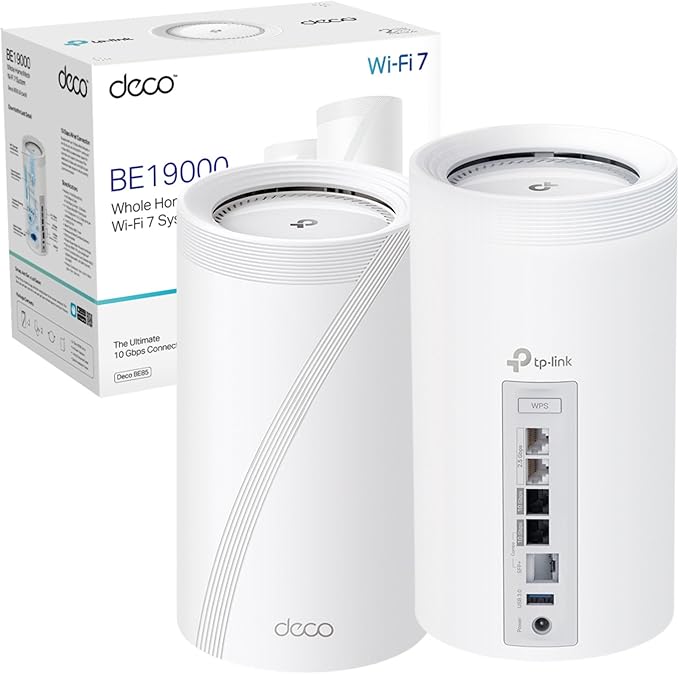
The TP-Link Deco BE85 is a premium tri-band Wi-Fi 7 mesh system built for networks that can use more than a fast wireless headline. Its real advantages are two 10Gbps-class connections, two 2.5Gbps ports, flexible backhaul, and enough radio capacity for demanding multi-gigabit homes.
That also makes it easy to overspend. A household on 500Mbps or 1Gbps broadband with mostly Wi-Fi 6 phones and laptops will rarely see a benefit that justifies the BE85 over a less expensive Deco system. This review focuses on the homes and network layouts where the additional hardware changes the result.
Quick verdict
The Deco BE85 is a strong premium mesh choice for a large or difficult home with multi-gigabit fibre, Wi-Fi 7 clients, fast local storage, or an existing 2.5GbE/10GbE network.
Its four multi-gigabit ports per unit are more important than the BE19000 or BE22000 number on the box. They let a node connect to fast broadband, a wired backhaul, a NAS, and another local device without immediately requiring an extra switch.
For a typical UK home on 1Gbps or slower broadband, the Deco BE68 or a good Wi-Fi 6/6E mesh is usually the more rational purchase. The BE85 is premium network infrastructure, not a universal fix for slow internet.
First check: UK BE19000 vs BE22000 versions
Do not assume every Deco BE85 has the same wireless specification. TP-Link's current UK page describes the BE19000 model: 11,520Mbps on 6GHz, 5,760Mbps on 5GHz, and 1,376Mbps on 2.4GHz. TP-Link's older UK V1 page and several US reviews describe a BE22000 version with a faster quoted 5GHz rate.
The shared buying logic is unchanged: both are tri-band Wi-Fi 7 systems with MLO, 320MHz channels on 6GHz, and the same high-end multi-gigabit port concept. Before ordering, match the retailer title and model class to the regional TP-Link support page, then check the hardware version when the units arrive.
The independent speed figures discussed below were recorded on a US BE22000 review unit. They show how distance, walls, client capability, and backhaul affect this platform, but they are not guaranteed results for a UK BE19000 unit.
Deco BE85 key specs
These specifications describe TP-Link's current UK BE19000 listing. Hardware versions and regional bundles can differ.
Pros
- Four multi-gigabit Ethernet ports per unit, including two 10Gbps-class connections.
- Tri-band Wi-Fi 7 with 6GHz, MLO, and 320MHz support for compatible clients.
- Ethernet, wireless, and combined backhaul options.
- USB 3.0 storage support and dedicated IoT, guest, and MLO network options.
- App-led setup and compatibility with other Deco models.
Cons
- Expensive and unnecessary for many homes on 1Gbps or slower broadband.
- BE19000 and BE22000 regional versions make listings easy to confuse.
- The fastest 6GHz performance is sensitive to walls, floors, and distance.
- Advanced HomeShield controls can require an ongoing subscription.
- The app is approachable, but the web interface is limited for power users.
Deco BE85 speed and range: what the tests mean
BE19000 is an aggregate physical link-rate class across three bands, not a promise of a 19Gbps internet connection. The client radio, broadband service, Ethernet path, interference, firmware, and building materials all limit real throughput.
Tom's Guide tested the US BE22000 version with a Wi-Fi 7 phone and measured 1.736Gbps at 15 feet, 790.4Mbps at 50 feet, 179.2Mbps at 75 feet, and 42.6Mbps at 90 feet. Its adjacent-room wall test reached 816.3Mbps. Those results demonstrate strong close-range capacity, but they also show how quickly a 6GHz-led result can fall as distance increases.
The same review found that an upstairs/downstairs wireless-backhaul test improved substantially after moving away from a 6GHz-only path to the combined 2.4/5GHz network. That is the useful lesson for a UK buyer: a faster radio class does not remove the need for sensible node placement, and 6GHz should not be expected to pass through dense floors as well as lower frequencies.
WIRED reported stable coverage from two units across a two-floor 1,600-square-foot test home and its backyard. That is encouraging, but it remains one house and one hardware environment. Buy the number of nodes for your layout, not a manufacturer square-foot figure, and avoid placing a satellite inside the dead zone it is meant to fix.
Best performance path: use Ethernet backhaul when possible. It preserves more wireless capacity for devices and gives the most predictable performance across brick walls, extensions, and multiple floors.
Why the ports are the strongest reason to buy
Each BE85 unit provides one 10Gbps RJ45/SFP+ combo port, one additional 10Gbps RJ45 port, two 2.5Gbps ports, and USB 3.0. Because the network ports are auto-sensing WAN/LAN connections, one can accept the internet feed while the others serve backhaul and local devices.
This matters in a network with a multi-gigabit ONT or modem, a 10GbE NAS, and wired nodes. A less expensive mesh often forces the buyer to add a multi-gigabit switch or choose which connection receives the fastest port. The BE85 leaves more room to build that topology directly at each node.
It does not make a 1Gbps internet plan faster. The additional headroom can still improve local file transfers and inter-node traffic, but only when the NAS, switch, cables, client adapters, and storage are fast enough to participate.
Setup with BT, Sky, Virgin Media, and other UK ISPs
The Deco app guides the initial setup. Connect the first BE85 to a compatible modem, ONT, or ISP router by Ethernet, create the network, update the firmware, and then add the second unit. The correct network mode depends on the provider hardware.
- Access Point mode: usually the simplest option when keeping the ISP router responsible for routing, DHCP, and provider-specific services.
- Router mode: gives the Deco system routing control, but the ISP device may need bridge or modem mode. Otherwise, two active routers can create double NAT.
- Wired backhaul: connect the nodes through compatible Ethernet cabling or a suitable switch. Confirm every link in the path supports the speed you expect.
TP-Link says the BE85 works with internet service providers, but that does not mean every provider hub exposes the same bridge-mode or authentication options. Check the current instructions for the exact ISP device rather than assuming a provider name guarantees one setup method.
Deco app, HomeShield, and administration
The Deco app prioritises guided setup and everyday controls. It includes connected-device management, guest and IoT networks, QoS, VPN client/server options, firmware updates, and network-mode settings. TP-Link also lists node and band preference controls on its current UK specification page.
The tradeoff is depth. Independent reviewers found the web interface limited compared with enthusiast routers. Buyers who expect detailed radio tuning, extensive logs, or desktop-first administration should inspect the current interface before committing to the Deco ecosystem.
HomeShield includes a basic plan, but TP-Link reserves some advanced network protection, reporting, and parental-control features for paid plans. Treat the subscription as part of the ownership decision if those features are essential; the premium hardware price does not unlock every software feature permanently.
Deco BE85 vs BE68
The BE85 and BE68 target the same premium Wi-Fi 7 buyer, but the BE85 earns its higher position through wired connectivity. Read our full Deco BE85 vs BE68 comparison for the detailed decision path.
| Decision point | Deco BE85 | Deco BE68 |
|---|---|---|
| Best for | Multi-gigabit networks, NAS users, 10GbE/SFP+ infrastructure, and complex wired layouts. | Homes that want premium Wi-Fi 7 mesh without paying for four multi-gigabit ports per node. |
| Ports per unit | 1x 10Gbps RJ45/SFP+ combo, 1x 10Gbps RJ45, and 2x 2.5Gbps. | 1x 10Gbps, 1x 2.5Gbps, and 1x Gigabit on the reviewed UK model. |
| Main advantage | More fast wired handoffs and greater topology flexibility. | Lower entry cost while retaining tri-band Wi-Fi 7 and multi-gigabit connectivity. |
| Main limitation | Its premium is wasted when the rest of the network cannot use the ports. | Fewer ports may require a separate switch in a demanding wired network. |
Alternatives worth comparing
| System | Choose it when | Tradeoff |
|---|---|---|
| TP-Link Deco BE68 | You want Wi-Fi 7 mesh and multi-gigabit ports, but do not need two 10Gbps-class connections per node. | Less wired flexibility than the BE85. |
| TP-Link Deco XE75 | You want tri-band mesh and 6GHz capacity at a lower hardware tier. | Wi-Fi 6E rather than Wi-Fi 7, with Gigabit ports on common UK versions. |
| TP-Link Deco X50 | You need straightforward whole-home coverage on standard broadband and can use Ethernet backhaul. | Dual-band Wi-Fi 6 and Gigabit networking. |
| A standalone Wi-Fi 7 router | One well-positioned router already covers the property. | Fewer placement points, but often better value than buying an unnecessary mesh pack. |
Who should buy the Deco BE85?
- Homes with multi-gigabit fibre and client devices capable of exceeding Gigabit Ethernet.
- NAS users moving large files across a 2.5GbE or 10GbE local network.
- Properties where wired backhaul can connect well-placed nodes across floors or extensions.
- Buyers who need several fast wired connections at more than one mesh location.
- Early adopters with multiple Wi-Fi 7 clients who understand that client hardware determines the benefit.
Who should skip it?
- Most households on sub-gigabit broadband with no fast local-storage workload.
- Small flats where one well-positioned router already provides reliable coverage.
- Homes with mostly Wi-Fi 5 or Wi-Fi 6 clients and no planned hardware refresh.
- Power users who require a deep browser-based administration interface.
- Anyone choosing by the BE number alone without checking the exact UK hardware version and bundle.
Frequently asked questions
Is the UK Deco BE85 BE19000 or BE22000?
TP-Link's current UK Deco BE85 page describes a BE19000 model, while its older UK V1 page and several US reviews describe BE22000 hardware. Check the exact retailer listing, region, and hardware version before buying because the 5 GHz radio specification differs.
Do I need multi-gigabit broadband for the Deco BE85?
No, but multi-gigabit broadband, fast local storage, or a 10GbE wired network is what makes the BE85's premium hardware useful. On a sub-gigabit plan with mostly Wi-Fi 6 devices, a less expensive mesh system is usually the better value.
Does the Deco BE85 support Ethernet backhaul?
Yes. Its auto-sensing Ethernet ports can be used for wired backhaul, and TP-Link also supports combined wired and wireless backhaul. Ethernet between nodes is the most predictable choice across dense walls and floors.
Does the Deco BE85 work with UK internet providers?
The BE85 connects by Ethernet to a compatible modem or ISP router. Access Point mode is usually the simplest way to retain the provider's routing, while Router mode can require bridge or modem mode to avoid double NAT. The exact setup depends on the provider's equipment.
What is the main difference between Deco BE85 and BE68?
The BE85's clearest advantage is its port layout: two 10Gbps-class ports and two 2.5Gbps ports per unit. The BE68 has fewer and slower wired connections, so it is usually the better-value choice unless the network needs several multi-gigabit handoffs.
Is TP-Link HomeShield free on the Deco BE85?
TP-Link includes a basic HomeShield plan, while some advanced security, reporting, and parental-control features require a paid Pro plan. Check the current UK plan details because features and pricing can change.
Choose the network, not the largest number
Compare the BE85 with the BE68 and the wider UK router shortlist before paying for ports or wireless capacity your home cannot use.
Compare Deco BE85 vs BE68 · See the best Wi-Fi routers for UK homes
How we evaluated the Deco BE85
This is a research-led review based on current UK specifications, regional hardware documentation, independent measurements, setup documentation, and current retailer information. TestedHarbor has not tested this model hands-on, so independent results are attributed and regional differences are stated rather than averaged together.
Sources checked
- TP-Link UK: current Deco BE85 BE19000 features and specifications
- TP-Link UK: older Deco BE85 V1 BE22000 product page
- TP-Link UK: Deco BE85 hardware versions, firmware, manuals, and support downloads
- Tom's Guide: independent US BE22000 throughput, range, wall, and backhaul testing
- WIRED: independent setup, coverage, software, power, and ownership assessment
- Amazon UK: current retailer listing, bundle, seller, and availability check