Review basis: Research-led; not hands-on. See our evidence standards and the page-specific sources at the end of this review.
Dead zones, buffering, and dropped connections in far rooms are the main reasons UK households look at mesh WiFi systems. The TP-Link Deco X50 is a mid-range mesh solution built around WiFi 6 (AX3000), designed to extend coverage without the cost of tri-band or WiFi 6E hardware.
This review covers whether the Deco X50 2-pack is the right choice for UK homes, including coverage, speed, setup, parental controls, and how it compares to other mesh systems at a similar price.
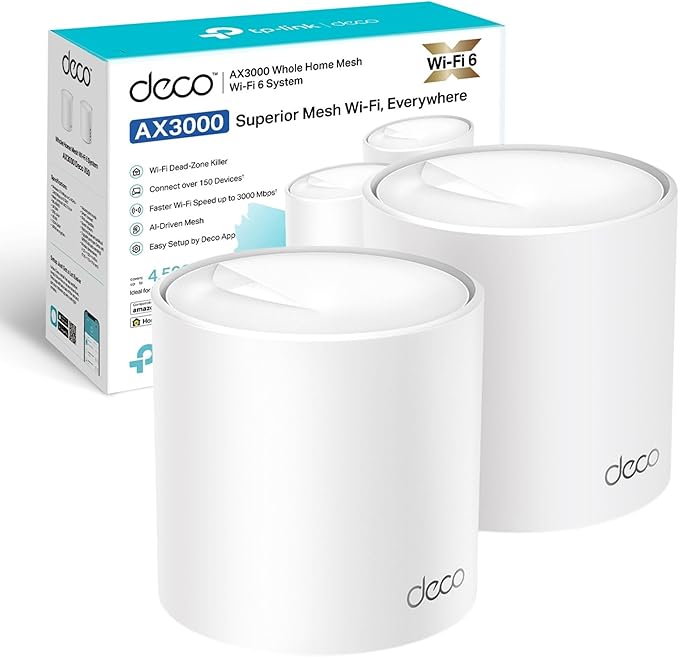
Quick verdict
The TP-Link Deco X50 is a practical mid-range WiFi 6 mesh option when its current bundle price is meaningfully below newer tri-band or WiFi 7 alternatives.
Its case rests on app-guided setup, three Gigabit Ethernet ports per unit, optional wired backhaul, and TP-Link's stated coverage for the 2-pack. Its main limitation is the dual-band design: wireless backhaul and client traffic share the 5 GHz radio, so performance depends heavily on node placement, walls, interference, and the devices in your home.
Key specs at a glance
Specifications are based on TP-Link's UK product page. Bundle availability is checked against the current Amazon UK listing.
Pros
- Manufacturer-rated coverage up to 4500 sq ft for the 2-pack.
- App-guided setup with clear placement and network steps.
- 3 Gigabit Ethernet ports per unit — useful for wired devices or wired backhaul.
- Optional Ethernet backhaul reduces reliance on the shared wireless backhaul.
- HomeShield includes security, QoS, and parental-control options.
- Can join a mesh with other Deco models, subject to feature and hardware-version differences.
Cons
- Dual-band only — no dedicated wireless backhaul channel.
- Some advanced HomeShield security and parental-control features require a paid plan.
- No WiFi 6E support if you want to future-proof for newer devices.
- Speed drops over longer distances without wired backhaul — expected for dual-band.
- No built-in modem — you still need your ISP router or a separate modem.
Deco X50 coverage and setup
The main selling point of the Deco X50 is coverage. TP-Link rates the 2-pack for up to 4500 sq ft and the 3-pack for up to 6500 sq ft. These are manufacturer estimates, not guaranteed household results: solid walls, floors, neighbouring networks, device radios, and poor node placement can all reduce usable range.
Setup is handled through the TP-Link Deco app. You connect the first unit to your ISP router or modem via Ethernet, launch the app, and follow the on-screen instructions. Additional units can then join the network automatically. TP-Link describes the process as app-guided and completed in minutes, but actual setup time depends on the ISP equipment and the network mode you choose.
For best results, place the primary unit in a central location near your router, and the satellite unit halfway toward the area with the weakest signal. Avoid placing units in cupboards or behind large metal objects.
If your home has thick stone or brick internal walls, consider Ethernet backhaul. A wired link avoids sharing the 5 GHz radio between backhaul and client traffic, which can improve consistency and available throughput.
Deco X50 speed: what to expect
AX3000 is the combined theoretical link-rate class across both bands, not a promise of a 3000 Mbps internet connection. Real throughput depends on the broadband plan, client device, channel width, interference, distance, walls, and whether the client is connected to the primary or satellite node.
The X50 supports a 160 MHz channel on 5 GHz, which can help compatible clients at short range. Independent testing by Expert Reviews found the X50 usable but behind faster tri-band systems and some dual-band competitors in its test environment. Treat those measurements as comparative evidence, not a prediction for a different home.
The main limitation is shared wireless backhaul. Without Ethernet between nodes, the 5 GHz radio carries both device traffic and inter-node communication. Households moving large files to a NAS, serving several demanding clients at once, or prioritising low-latency gaming should consider wired backhaul or compare a tri-band mesh.
Deco X50 HomeShield security and parental controls
HomeShield is TP-Link's security, QoS, and parental-control suite. TP-Link currently provides a basic feature set without an additional subscription, including:
- Parental controls: set time limits, pause internet per device, and filter content by age.
- Device prioritisation: allocate bandwidth to specific devices (e.g., work laptop or gaming console).
- Network security scan: checks for vulnerabilities, open ports, and weak passwords.
Paid HomeShield plans add more advanced security, reporting, and parental-control options. Features and plan terms can change by app version, region, and hardware version, so check TP-Link's current HomeShield information before treating a specific capability as included.
Deco X50 vs alternatives
The Deco X50 sits in the mid-range mesh market. Here is how it compares to common alternatives available in the UK.
| System | Best for | Main difference vs Deco X50 |
|---|---|---|
| TP-Link Deco X50 (2-pack) | Buyers prioritising Ethernet ports and wired-backhaul flexibility | Baseline: AX3000, dual-band, HomeShield, 3 Ethernet ports per unit. |
| TP-Link Deco X55 | Buyers comparing similar AX3000 bundles | Closely related dual-band specifications. Check the exact hardware revision, support page, ports, and bundle price. |
| TP-Link Deco XE75 | Busy homes needing more wireless backhaul capacity | Tri-band WiFi 6E adds a 6 GHz band and more backhaul flexibility, but usually costs more. |
| Amazon Eero 6+ | Alexa-heavy smart homes | Tight Alexa integration. Dual-band like the X50. Fewer Ethernet ports per unit. |
| Google Nest WiFi Pro | Google Home ecosystems, WiFi 6E | WiFi 6E support for newer devices. Higher price point. Fewer wired ports. |
Who should buy the Deco X50?
The Deco X50 makes sense if you tick several of these boxes:
- You need more than one placement point to reach rooms your current router does not cover.
- You want a simple setup without configuring VLANs, access points, or bridge mode manually.
- You want basic HomeShield security, QoS, and parental-control options in one app.
- You want Gigabit Ethernet ports on the mesh nodes for wired devices (desktop, console, NAS).
- You do not need multi-gigabit Ethernet, WiFi 6E, or a dedicated wireless backhaul band.
Who should skip it?
- Power users who need a dedicated wireless backhaul — compare tri-band options such as the Deco XE75.
- Buyers who want WiFi 6E future-proofing — consider Google Nest WiFi Pro or Deco XE75.
- Very small flats where a single good router is enough — a mesh system is overkill.
- Users who need a built-in modem — the Deco X50 requires a separate modem or ISP router.
Frequently asked questions
Is the Deco X50 good for a large UK home?
TP-Link rates the X50 2-pack for up to 4500 sq ft and the 3-pack for up to 6500 sq ft. Those are manufacturer estimates rather than guaranteed results; walls, floors, interference, and node placement can reduce coverage. Larger or difficult properties may benefit from a third node or Ethernet backhaul.
Does the Deco X50 support wired backhaul?
Yes. Each unit has three Gigabit Ethernet ports. Connecting the nodes by Ethernet avoids sharing the 5 GHz radio for wireless backhaul and client traffic, which can improve consistency and available throughput.
Is HomeShield free?
TP-Link provides a basic HomeShield feature set without an additional subscription, while advanced security, reporting, and parental-control features may require a paid plan. Features and plan terms can change, so check TP-Link's current HomeShield page before buying.
Can I mix Deco X50 with other Deco models?
Yes, TP-Link says Deco models can form one mesh network. The main Deco determines parts of the available feature set, however, and mixing models or hardware versions can affect which advanced options appear in the app.
Does it work with Sky, BT, or Virgin Media?
The X50 connects by Ethernet to an ISP router or modem. Access Point mode is usually the simplest way to keep the ISP router handling routing; Router mode may require modem or bridge mode to avoid double NAT. The exact setup depends on the provider's equipment.
What is the difference between Deco X50 and X55?
The UK X50 and X55 are closely related AX3000 dual-band systems. Hardware revisions and regional bundles can differ, so compare the exact hardware version, support page, port specification, and current bundle price rather than choosing by model number alone.
Ready to fix your home WiFi?
Check the current price and bundle options for the TP-Link Deco X50 on Amazon UK.
Affiliate disclosure: we may earn a commission if you purchase through this link. Prices, availability, and bundle options can change.
Still deciding between one router and a mesh system? Compare our current Wi-Fi router picks for UK homes →
Need more coverage? Read the TP-Link Deco X55 (3-pack) review →
How we evaluated the Deco X50
This is a research-led review based on official specifications, support documentation, current retailer information, independent measurements, and documented owner feedback. TestedHarbor has not tested this model hands-on.
Sources checked
- TP-Link UK: Deco X50 product specifications and coverage claims
- TP-Link UK: Deco X50 hardware versions, firmware, and support downloads
- TP-Link: mixing Deco models and main-node feature behaviour
- Expert Reviews: independent Deco X50 setup and throughput testing
- Amazon UK: current bundle availability and documented owner feedback