The TP-Link Deco X55 is the updated sibling of the popular Deco X50, built on the same AX3000 dual-band WiFi 6 platform but packaged as a 3-pack with Alexa and Google Home voice integration. For UK households that need to cover a large home without managing complex networking hardware, it is one of the most straightforward options on the market.
This review looks at whether the Deco X55 3-pack is the right mesh system for your UK home, how it compares to the X50 and other alternatives, and where it falls short.
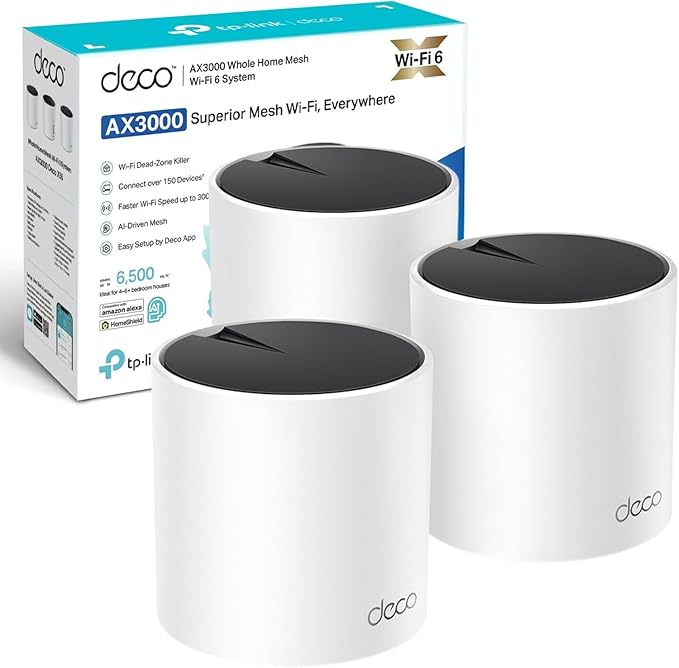
Quick verdict
The TP-Link Deco X55 is the best WiFi 6 mesh system for large UK homes that want Alexa integration, 6500 sq ft coverage, and simple app-based setup without paying for WiFi 7.
The Deco X55 3-pack is the default recommendation for UK homes that need broad mesh coverage without spending tri-band money. It covers up to 6500 sq ft, supports 150 devices, sets up in minutes, and adds Alexa/Google Home voice control that the X50 lacks out of the box. The trade-off is the same as every dual-band mesh: no dedicated wireless backhaul, so very heavy multi-device loads benefit from wired Ethernet between units.
Key specs at a glance
Based on the current Amazon UK listing for the Deco X55 (3-pack).
Pros
- 6500 sq ft coverage with 3 units — handles large and multi-storey UK homes.
- Alexa and Google Home voice control built in for hands-free network management.
- AI-driven seamless roaming — devices switch between nodes without drops.
- Simple Deco app setup, typically under 10 minutes for all three units.
- Wired backhaul option via Gigabit Ethernet for thick-walled homes.
- Cross-compatible with all other Deco models for future expansion.
- HomeShield Basic included free (parental controls, security scan, device priority).
Cons
- Dual-band only — no dedicated wireless backhaul channel.
- HomeShield Pro (real-time protection, advanced reports) requires a subscription.
- No WiFi 6E — not future-proofed for 6 GHz devices.
- No built-in modem — requires your ISP router or a separate modem.
- Throughput drops at range without wired backhaul — normal for dual-band mesh.
Deco X55 vs Deco X50: what actually changed?
The honest answer: not much under the hood. Both use the same AX3000 dual-band WiFi 6 chipset, both support HomeShield, and both handle up to 150 devices. The differences are:
- Voice control: The X55 includes Alexa and Google Home integration. The X50 does not list this as a feature.
- Default pack size: The X55 is primarily sold as a 3-pack (6500 sq ft). The X50 is commonly sold as a 2-pack (4500 sq ft).
- Design: Slightly updated housing on the X55, though both are white cylindrical units.
If you do not need voice control and a 2-pack is enough for your home, the Deco X50 may be better value. If you want 3 units and voice integration, the X55 is the cleaner buy.
Coverage and setup
Three units cover 6500 sq ft, which in UK terms means a 4-5 bedroom detached house with upstairs, downstairs, kitchen extension, and garden coverage. Each unit handles about 2200 sq ft on its own, so placement matters less than with a 2-pack — you have more flexibility to cover awkward spots.
Setup is identical to other Deco systems: download the app, plug the first unit into your ISP router, follow the prompts, and add the other two units. The app finds them automatically. Most users report all three units online within 10-15 minutes.
For older UK homes with thick internal walls (Victorian terraces, stone cottages), run Ethernet between at least two units for wired backhaul. This eliminates the dual-band bottleneck between floors.
Speed and performance
Real-world performance mirrors the Deco X50 because the hardware platform is the same. On a 300-500 Mbps UK broadband connection, expect full speed in the same room as a node and 60-80% throughput two rooms away over wireless.
The AI-driven mesh handles band steering (moving devices between 2.4 and 5 GHz) and node steering (handing off devices to the nearest unit) automatically. In daily use this means video calls do not drop when you walk between rooms, and streaming continues as you move around the house.
Heavy multi-device scenarios (4K streaming + gaming + video calls + smart home devices all at once) are where dual-band shows its limits. If your household regularly maxes out all channels simultaneously, tri-band options like the Netgear Orbi or TP-Link Deco XE75 handle that better.
Smart home and voice control
The X55 works with Alexa and Google Home out of the box. You can:
- Ask Alexa to pause WiFi for specific devices or profiles ("Alexa, pause WiFi for the kids").
- Check network status by voice ("Hey Google, how many devices are connected?").
- Prioritise devices before a meeting or gaming session.
This is a convenience feature, not a performance one. It does not make the WiFi faster — it just makes management easier for households that already use voice assistants.
HomeShield security and parental controls
Same as the X50: HomeShield Basic is free and includes parental controls (content filtering, screen time limits, device-level pausing), QoS device prioritisation, and a network security scan that checks for open ports and weak passwords.
HomeShield Pro adds real-time malware and phishing protection, more detailed usage reports, and advanced content filtering by category. It costs a monthly or annual fee. Most families find the free tier sufficient for day-to-day use.
Deco X55 vs alternatives
| System | Best for | Main difference vs Deco X55 |
|---|---|---|
| TP-Link Deco X55 (3-pack) | Large UK homes, voice-controlled households, families | Baseline: AX3000, 6500 sq ft, Alexa/Google Home, HomeShield. |
| TP-Link Deco X50 (2-pack) | Smaller homes, budget buyers | Same platform. No voice control. 2-pack covers 4500 sq ft. Often cheaper. |
| Netgear Orbi RBK352 | Speed-focused buyers | Tri-band with dedicated backhaul. Better raw throughput between nodes. Higher price. |
| Amazon Eero 6+ | Alexa-native smart homes | Deeper Alexa integration (doubles as Zigbee hub). Dual-band. Fewer Ethernet ports. |
| TP-Link Deco XE75 | Future-proofing with WiFi 6E | Tri-band with 6 GHz. More expensive. Better for homes with WiFi 6E devices. |
Who should buy the Deco X55?
- UK homes with 4+ bedrooms that need more than 2 mesh nodes.
- Households using Alexa or Google Home that want voice-based WiFi management.
- Families who want built-in parental controls without configuring complex router software.
- Anyone upgrading from a single ISP router and tired of dead zones upstairs or in the kitchen.
- Buyers who want the option to expand later with additional Deco units.
Who should skip it?
- Small flats where a single router covers the whole space — mesh is overkill.
- Power users who need dedicated wireless backhaul — get tri-band (Orbi, Deco XE75).
- Buyers who want WiFi 6E for future devices — the X55 maxes out at WiFi 6.
- Anyone who already owns a Deco X50 setup that works — the X55 is not a meaningful upgrade.
Frequently asked questions
What is the difference between Deco X55 and Deco X50?
Same AX3000 WiFi 6 platform. The X55 adds Alexa/Google Home voice control and is typically sold as a 3-pack (6500 sq ft) vs the X50's 2-pack (4500 sq ft). Core WiFi performance is identical.
Does the Deco X55 work with Alexa?
Yes. You can control the network by voice — pause internet, prioritise devices, and check status — using Alexa or Google Home.
Is the 3-pack enough for a large UK home?
It covers 6500 sq ft, which handles most 4-5 bedroom UK homes. For very thick stone walls or detached outbuildings, use wired backhaul between at least two units.
Can I add more units later?
Yes. Add any Deco unit through the app at any time. All Deco models are cross-compatible.
Does it work with Sky, BT, or Virgin Media?
Yes. Plug the first unit into your ISP router via Ethernet, disable your router's WiFi, and the Deco mesh takes over. Works with any UK broadband provider.
Ready to cover your whole home?
Check the current price and availability for the TP-Link Deco X55 3-pack on Amazon UK.
Affiliate disclosure: we may earn a commission if you purchase through this link. Prices, availability, and bundle options can change.
On a tighter budget? Read the TP-Link Deco X50 (2-pack) review →