Quick verdict
For most UK homes on 1 Gbps broadband, the TP-Link Deco BE68 is the best-value WiFi 7 mesh system in 2026 — it delivers 90% of the BE85's wireless performance at half the price.
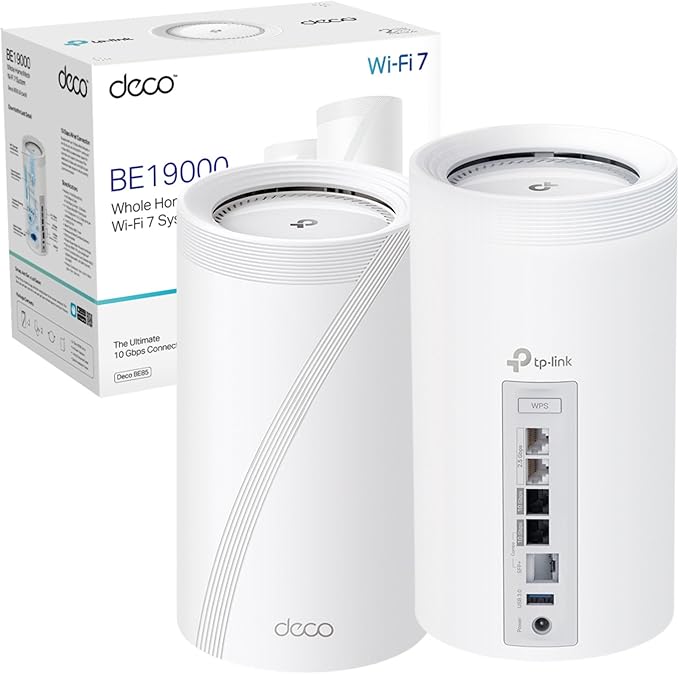
Deco BE85 — the premium choice for homes with multi-gig broadband, a NAS, or a network design that needs multiple 10G handoffs per node. If you already have or plan to install structured wiring and 2.5 Gbps+ internet, the BE85 earns its price with port headroom that the BE68 cannot match.
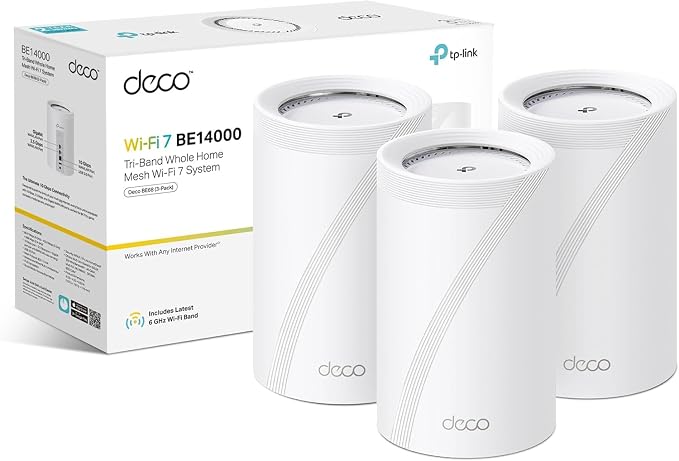
Deco BE68 — the better buy for most UK homes. It keeps WiFi 7, tri-band with dedicated backhaul, and a 10GbE port at roughly half the price. On a 1 Gbps internet plan with standard home usage, wireless performance is nearly identical to the BE85.
The deciding factor is not WiFi speed — it is how many fast wired connections you need at each node.
Deco BE85 vs BE68: full spec comparison
| Spec | Deco BE85 | Deco BE68 |
|---|---|---|
| WiFi class | BE22000 tri-band | BE14000 tri-band |
| Bands | 2.4 GHz + 5 GHz + 6 GHz | 2.4 GHz + 5 GHz + 6 GHz |
| Top 6 GHz rate | 11,520 Mbps | 8,647 Mbps |
| MLO support | Yes | Yes |
| Dedicated backhaul | Yes (6 GHz) | Yes (6 GHz) |
| Ethernet ports per node | 1x 10GbE RJ45/SFP+ combo + 1x 10GbE + 2x 2.5GbE | 1x 10GbE + 1x 2.5GbE + 1x 1GbE |
| Coverage (3-pack) | ~7,500 sq ft | ~8,100 sq ft |
| Max devices | 200+ | 200+ |
| Node dimensions | 5.04 x 5.04 x 9.29 in (tall tower) | 4.23 x 4.23 x 6.93 in (compact tower) |
| VPN support | Yes (client + server) | Yes (client + server) |
| Smart home | Alexa + Google Home | Alexa + Google Home |
| HomeShield | Basic free, Pro subscription | Basic free, Pro subscription |
| Typical UK price (3-pack) | £750–£900 | £400–£500 |
The real difference: ports, not WiFi speed
On paper the BE85 has a faster WiFi class (BE22000 vs BE14000), but in practice, real-world wireless performance between the two is closer than the spec gap suggests. Both use 6 GHz dedicated backhaul, both support MLO, and both handle 200+ devices.
The actual differentiator is the wired side. The BE85 gives you four multi-gig ports per node (including an SFP+ combo port), which means you can simultaneously connect a 10G switch uplink, a NAS, and wired satellites without running out of fast ports. The BE68 has one 10GbE, one 2.5GbE, and one Gigabit — perfectly capable, but you need to plan your wired topology more carefully.
If your network design starts with "I need a 10G switch feeding two or more wired branches," choose the BE85. If it starts with "I want whole-home WiFi 7 with one wired connection to my ISP router," choose the BE68.
Expected real-world performance
Based on available test data from installed systems and third-party reviews, here is what to expect in a typical UK home:
| Scenario | Near room | Mid room | Far room | Notes |
|---|---|---|---|---|
| BE85, wired backhaul | >1.4 Gbps | 0.9–1.2 Gbps | 0.6–0.9 Gbps | Best consistency; ideal for multi-gig switching |
| BE68, wired backhaul | >1.2 Gbps | 0.8–1.1 Gbps | 0.5–0.8 Gbps | Excellent value once primary node is wired |
| BE85, wireless backhaul | >1.0 Gbps | 0.6–0.9 Gbps | 0.4–0.7 Gbps | MLO helps stability, still behind wired |
| BE68, wireless backhaul | >0.9 Gbps | 0.5–0.8 Gbps | 0.3–0.6 Gbps | Usable for most homes; wired backhaul recommended |
These are field estimates, not lab numbers. Wall density, floor materials, node placement, and client device capability all affect actual results. Wired backhaul consistently outperforms wireless regardless of which model you choose.
Backhaul strategy: the most important decision
A wired Deco BE68 outperforms a wireless Deco BE85 in real-world speed and consistency — spend the price difference on a Cat6 run between floors if you have to choose.
The single decision that affects real-world mesh performance more than choosing between BE85 and BE68 is whether you wire the backhaul.
- Best: Ethernet wired backhaul between nodes. One Cat6 run between floors gives both models near-full performance at every node.
- Good: MoCA 2.5 over existing coax. If your home has coax cabling, this is the fastest retrofit option without pulling new Ethernet.
- Acceptable: Wireless MLO backhaul. WiFi 7 makes this better than WiFi 6 mesh, but physics still wins — dense walls and floors reduce throughput.
If you are choosing between spending an extra £300–£400 on the BE85 or spending that money on a Cat6 run between floors, the wiring wins in almost every home. A wired BE68 outperforms a wireless BE85 in real-world consistency.
Channel width configuration
WiFi 7 supports wider channels (up to 320 MHz on 6 GHz), but wider is not always better in real homes. Recommended starting points:
- 6 GHz: Start at 80 MHz. Move to 160 MHz after testing near/mid/far rooms. Treat 320 MHz as optional.
- 5 GHz: Start at 40 MHz. Avoid DFS channels if you experience intermittent drops.
- 2.4 GHz: Leave at 20 MHz. This band is for IoT and legacy devices, not speed.
Wider channels produce higher peak speeds but are more susceptible to interference. In dense UK neighbourhoods, conservative channel widths with clean backhaul outperform aggressive settings with unstable links.
Node placement in UK homes
Both the BE85 and BE68 follow the same placement rules:
- Place the gateway node centrally, near the ISP router and the main wired backhaul riser.
- Put satellite nodes near stair landings or hallway junctions — not in far corners or closed cupboards.
- Keep nodes elevated (shelf height, not floor level) and away from metal objects, mirrors, and large TVs.
- One node per floor is usually enough for 3-storey UK homes. Two per floor only if the floor plan is extremely long.
The BE85 is physically larger (9.3 inches tall vs 6.9 inches for the BE68). In homes with shallow shelves or built-in cabinetry, the BE68 is easier to place discreetly.
HomeShield: same on both models
Both the BE85 and BE68 include the same HomeShield suite:
- Free tier: Parental controls, device prioritisation, network security scanning, guest WiFi.
- Pro tier (subscription): Real-time threat protection, advanced content filtering, detailed usage reports.
HomeShield is not a differentiator between the two models. Factor the Pro subscription cost into your total ownership budget if you plan to use the advanced features.
Who should buy which?
Choose Deco BE85 if:
You have 2.5 Gbps+ broadband, a 10G NAS or switch, or need multiple fast wired connections at each node. Your network is already wired or you are investing in structured cabling.
Choose Deco BE68 if:
You want the best-value WiFi 7 mesh on a 1 Gbps plan. One 10GbE port per node is enough. You want great performance without paying premium tier prices.
When to skip both and stay on WiFi 6
- Your broadband is under 500 Mbps and you have no multi-gig local devices — the Deco X50 or X55 is more cost-effective.
- Your home is small enough that a 2-pack WiFi 6 mesh covers everything — no need for WiFi 7 overkill.
- You have no WiFi 7 devices and no near-term plans to buy any — the benefits are unrealised.
For a detailed look at the WiFi 6 options: Deco X50 review · Deco X55 review
Frequently asked questions
What is the main difference between Deco BE85 and BE68?
The BE85 has more and faster Ethernet ports per node (two 10GbE + two 2.5GbE vs one 10GbE + one 2.5GbE + one 1GbE). WiFi performance is similar; the port layout is the practical divider.
Is the BE85 worth the extra cost?
Only if you need multiple 10G-class connections per node — for NAS traffic, multi-gig broadband, or a wired switching core. For most 1 Gbps UK homes, the BE68 delivers nearly identical WiFi performance at half the price.
Do both support wired backhaul?
Yes. Both support Ethernet wired backhaul. The BE85 has more ports to integrate into complex wired topologies. The BE68 works best with a simpler layout.
Should I wire the backhaul or buy the more expensive model?
Wire the backhaul. A wired BE68 outperforms a wireless BE85 in real-world consistency. Spend the price difference on a Cat6 run between floors if you have to choose.
Can I mix BE85 and BE68 nodes?
Yes. All TP-Link Deco units are cross-compatible. You can use a BE85 as the gateway with BE68 satellites, or mix with any other Deco model.
Is WiFi 7 worth upgrading to in 2026?
If you have gigabit+ broadband and are buying a new mesh system anyway, WiFi 7 with dedicated 6 GHz backhaul is a meaningful upgrade over WiFi 6 dual-band. If your current WiFi 6 mesh works fine, there is no urgent reason to replace it.
Compare both models on Amazon UK
Pricing, bundles, and availability change frequently. Check both before deciding.
Affiliate disclosure: we may earn a commission if you purchase through these links. Prices and availability can change.
Want the full single-model breakdown? Read the Deco BE68 review →